
Organic traffic is one of the most important indicators of a website’s SEO success. When users find your website through search engines without clicking on paid advertisements, they are counted as organic visitors. Understanding how to track organic traffic in Google Analytics helps website owners measure SEO performance, identify growth opportunities, and make data-driven decisions.
Whether you run a business website, blog, or eCommerce store, learning how to track organic traffic in Google Analytics can provide valuable insights into your search visibility and overall digital marketing strategy.
What Is Organic Traffic?
Organic traffic refers to visitors who arrive at your website through unpaid search engine results. These users typically discover your content by searching for relevant keywords on Google, Bing, or other search engines.
Unlike paid traffic, organic search traffic is generated through effective search engine optimization efforts. Monitoring organic traffic performance allows businesses to evaluate how well their content ranks and how successfully they attract relevant users.
Google Analytics provides detailed reports that help website owners analyze website traffic, understand visitor behavior, and measure organic search performance over time.
Why Tracking Organic Traffic Matters
Tracking organic traffic helps you determine whether your SEO campaigns are delivering results. By monitoring traffic trends, user engagement metrics, and conversion tracking data, you can identify which pages perform best and which areas require improvement.
Many businesses invest heavily in SEO. Whether you work with top SEO experts in Pakistan or manage optimization in-house, accurate traffic monitoring is essential for measuring success.
Organic traffic data also reveals how users interact with your website after arriving from search engines. This information can guide content improvements, technical optimization, and future marketing strategies.
How to Track Organic Traffic in Google Analytics 4
Access the Traffic Acquisition Report
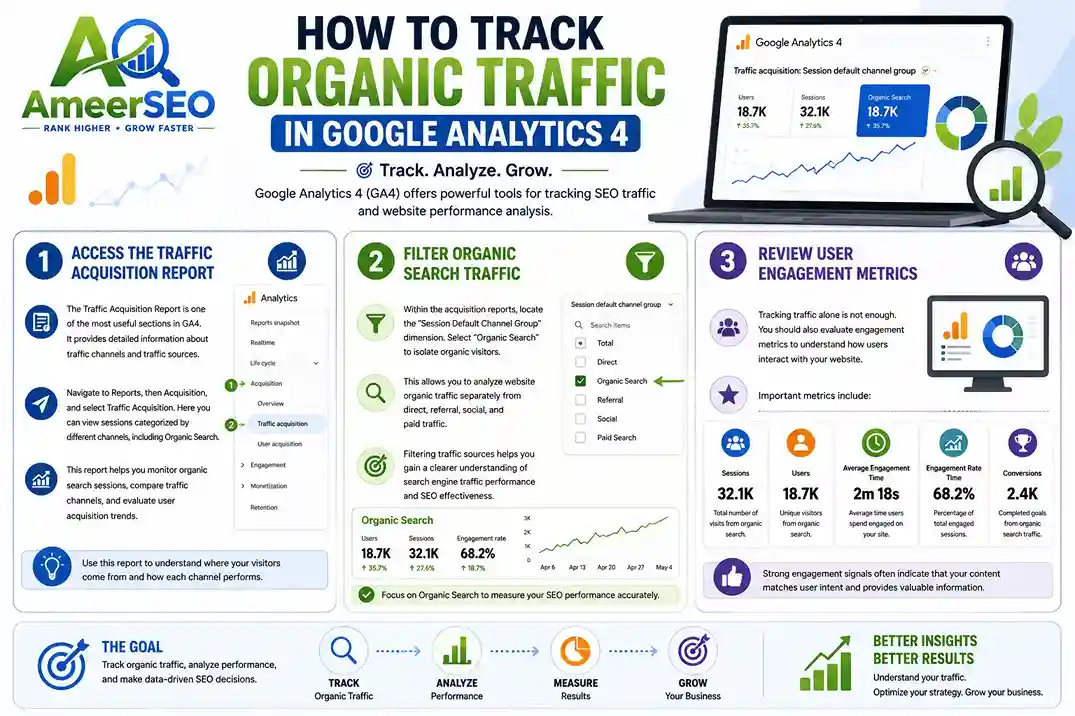
The Traffic Acquisition Report is one of the most useful sections in GA4. It provides detailed information about traffic channels and traffic sources.
Navigate to Reports, then Acquisition, and select Traffic Acquisition. Here you can view sessions categorized by different channels, including Organic Search.
This report helps you monitor organic search sessions, compare traffic channels, and evaluate user acquisition trends.
Filter Organic Search Traffic
Within the acquisition reports, locate the “Session Default Channel Group” dimension. Select “Organic Search” to isolate organic visitors.
This allows you to analyze website organic traffic separately from direct, referral, social, and paid traffic.
Filtering traffic sources helps you gain a clearer understanding of search engine traffic performance and SEO effectiveness.
Review User Engagement Metrics
Tracking traffic alone is not enough. You should also evaluate engagement metrics to understand how users interact with your website.
Important metrics include:
- Sessions
- Users
- Average engagement time
- Engagement rate
- Conversions
Strong engagement signals often indicate that your content matches user intent and provides valuable information.
Analyzing Organic Traffic Performance
Once you begin tracking organic traffic in Google Analytics, the next step is understanding what the data means.
Organic traffic trends should be reviewed regularly to identify patterns. Consistent growth often suggests that your SEO strategy is working effectively.
If traffic declines unexpectedly, investigate potential causes such as algorithm updates, technical issues, keyword ranking drops, or content changes.
Website analytics data provides insights into visitor behavior and helps businesses make informed optimization decisions.
Tracking Landing Page Performance
Landing page performance plays a major role in SEO reporting.
Navigate to the Landing Pages Report in GA4 to identify pages that attract the most organic visitors.
High-performing landing pages often rank well for target keywords and generate significant search engine referrals.
Analyzing landing page data helps you understand which content drives organic search traffic and which pages require additional optimization.
This information is especially valuable when learning how to track SEO results using Google Analytics.
Using Google Search Console with Google Analytics
Google Search Console and Google Analytics work together to provide a complete picture of SEO performance.
Search Console offers data related to:
- Clicks
- Impressions
- Average position
- Search queries
Google Analytics focuses on user behavior after visitors arrive on your website.
Combining both tools allows you to analyze search visibility, monitor keyword performance, and measure conversion tracking results more effectively.
Key SEO Metrics to Monitor
Tracking SEO traffic involves more than counting visitors.
Organic search sessions reveal the volume of traffic generated through search engines.
Engagement rate measures user interaction with your content.
Conversions show whether organic visitors complete desired actions such as purchases, form submissions, or inquiries.
Traffic segmentation helps identify high-performing audience groups and uncover opportunities for further optimization.
Businesses offering affordable SEO services in Lahore often rely on these metrics to demonstrate measurable improvements to clients.
Common Mistakes When Tracking Organic Traffic
Many website owners focus only on total traffic numbers without evaluating quality.
Ignoring conversion tracking can lead to inaccurate conclusions about SEO success.
Failing to monitor traffic acquisition reports regularly may cause businesses to overlook traffic declines or technical problems.
Another common mistake is neglecting traffic source analysis. Understanding where visitors come from helps refine marketing strategies and improve search performance.
Consistent monitoring ensures that website analytics data remains actionable and meaningful.
Comparison Table: Google Analytics Metrics for Organic Traffic
| Metric | Purpose | Why It Matters |
|---|---|---|
| Users | Number of unique visitors | Measures audience growth |
| Sessions | Total visits | Indicates traffic volume |
| Engagement Rate | User interaction level | Shows content quality |
| Average Engagement Time | Time spent on site | Reflects visitor interest |
| Conversions | Completed goals | Measures business outcomes |
| Landing Pages | Entry pages from search | Identifies top-performing content |
| Traffic Sources | Origin of visitors | Helps analyze marketing effectiveness |
| Organic Search Sessions | Search engine visits | Evaluates SEO performance |
Improving Organic Traffic Growth
Growing organic traffic requires consistent effort.
Create high-quality content that answers user questions and solves problems. Focus on search intent and optimize pages for relevant keywords.
Regularly review SEO analytics tools and website performance analysis reports. Monitor traffic trends and update content when necessary.
Businesses seeking professional guidance often work with agencies such as Ameer SEO to improve search visibility and organic search performance through strategic optimization.
As you continue learning how to monitor organic traffic growth over time, remember that SEO is a long-term process requiring ongoing analysis and refinement.
Conclusion
Understanding how to track organic traffic in Google Analytics is essential for measuring SEO performance and improving search visibility. Google Analytics 4 provides powerful acquisition reports, traffic segmentation capabilities, and engagement metrics that help businesses analyze website traffic effectively.
By monitoring organic search sessions, reviewing landing page performance, tracking conversions, and integrating Google Search Console data, website owners can make informed decisions that support long-term growth. Consistent traffic monitoring ensures your SEO strategy remains aligned with user behavior and business objectives.
Frequently Asked Questions
How do I check organic traffic in Google Analytics 4?
Go to Reports, then Acquisition, and select Traffic Acquisition. Filter the report by Organic Search to view organic traffic data.
What is the difference between organic traffic and direct traffic?
Organic traffic comes from unpaid search engine results, while direct traffic occurs when users enter a website URL directly or use bookmarks.
Which Google Analytics report shows organic traffic?
The Traffic Acquisition Report is the primary report used to analyze organic search traffic in GA4.
Can Google Analytics track SEO performance?
Yes. Google Analytics tracks organic search sessions, user engagement, landing page performance, and conversions, helping measure SEO effectiveness.
Why is my organic traffic decreasing?
Traffic declines can result from search engine algorithm updates, keyword ranking losses, technical website issues, increased competition, or content changes.
Should I use Google Search Console with Google Analytics?
Yes. Google Search Console provides search query, click, and impression data, while Google Analytics shows visitor behavior and conversion metrics. Together they offer comprehensive SEO reporting.
How often should I monitor organic traffic?
Most SEO professionals recommend reviewing organic traffic weekly and conducting detailed performance analysis monthly to identify trends and opportunities.