

Launching a website without checking its technical SEO is like opening a store without a front door. Even the best content and design cannot perform well if search engines struggle to crawl, index, or understand your website. At Ameer SEO, we have seen many websites lose valuable traffic simply because critical technical SEO elements were overlooked before launch.
Whether you own a business website, an eCommerce store, or a blog, following an essential technical SEO checklist before publishing a website helps ensure your pages are accessible, fast, secure, and ready to rank in Google. A properly optimized website improves user experience, increases crawl efficiency, and lays the foundation for long-term organic growth.
If you are searching for the best SEO service in Pakistan or looking to learn from the best SEO experts in Lahore, understanding technical SEO before your website goes live is one of the most valuable investments you can make.
Why Technical SEO Matters Before Publishing
Technical SEO is the process of optimizing your website’s infrastructure so search engines can efficiently crawl, index, and rank your pages. Unlike content SEO, which focuses on keywords and writing, technical SEO ensures your website functions correctly behind the scenes.
Publishing a website without completing a technical SEO audit often results in indexing problems, duplicate content, slow loading speeds, broken internal links, and poor user experience. These issues can delay rankings even if your content is outstanding.
Completing a technical SEO checklist before website launch gives Google confidence that your website is reliable, secure, and easy to understand.
Essential Technical SEO Checklist Before Publishing a Website
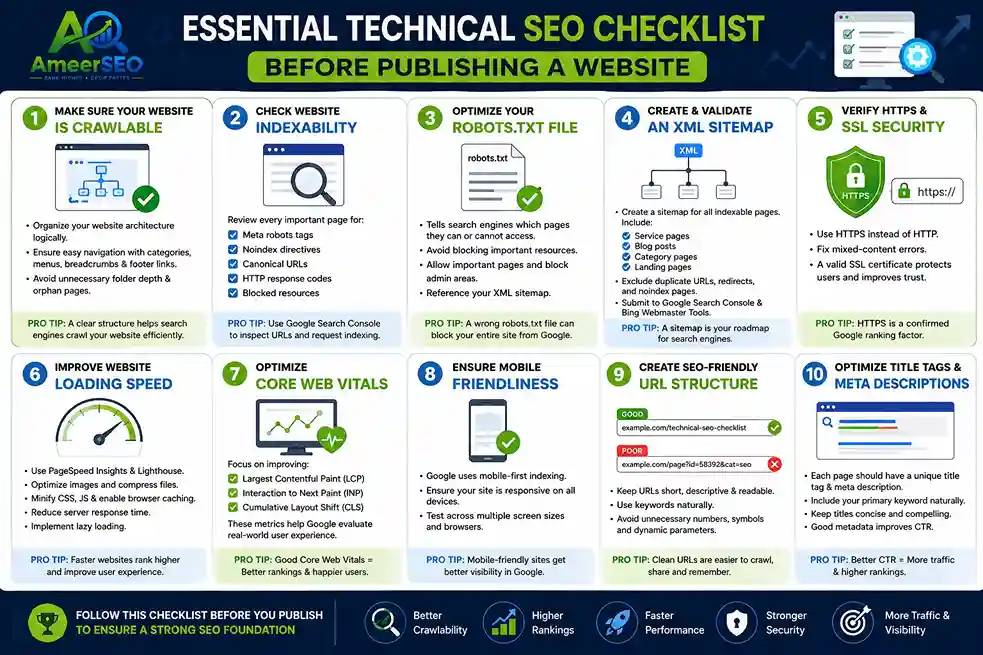
Make Sure Your Website Is Crawlable
Search engines must be able to crawl every important page on your website. If Googlebot cannot access your pages, they will never appear in search results regardless of content quality.
Start by reviewing your website architecture. Pages should be organized logically, allowing visitors and search engines to move naturally between related topics. Avoid unnecessary folder depth and orphan pages that have no internal links pointing to them.
Review your navigation carefully. Categories, menus, breadcrumbs, and footer links all contribute to better crawlability.
Check Website Indexability
Crawlability and indexability are different. Google may crawl your pages but still choose not to index them.
Review every important page for:
Meta robots tags
Noindex directives
Canonical URLs
HTTP response codes
Blocked resources
After publishing, use Google Search Console to inspect URLs and request indexing where necessary.
Optimize Your Robots.txt File
Your robots.txt file tells search engines which sections of your website they can access.
An incorrectly configured robots.txt file can accidentally block your entire website from Google.
Before launch, verify that important pages are crawlable while administrative pages remain blocked.
A proper robots.txt file should also reference your XML sitemap.
Create and Validate an XML Sitemap
An XML sitemap acts as a roadmap for search engines by listing all indexable pages.
Include:
Service pages
Blog posts
Category pages
Landing pages
Exclude duplicate URLs, redirects, and noindex pages.
Submit your XML sitemap through Google Search Console and Bing Webmaster Tools immediately after launch.
Verify HTTPS and SSL Security
Security has become a confirmed Google ranking factor.
Every page should load securely using HTTPS instead of HTTP.
Check for mixed-content errors where images, scripts, or stylesheets still load through insecure connections.
A valid SSL certificate protects visitors while improving trust signals.
Improve Website Loading Speed
Website performance directly affects both rankings and user satisfaction.
Use Google PageSpeed Insights and Google Lighthouse to identify performance bottlenecks.
Optimize images, compress CSS and JavaScript, enable browser caching, reduce server response time, and implement lazy loading where appropriate.
Fast websites encourage visitors to stay longer and reduce bounce rates.
Optimize Core Web Vitals
Core Web Vitals measure real-world user experience.
Focus on improving:
Largest Contentful Paint (LCP)
Cumulative Layout Shift (CLS)
These metrics help Google evaluate page quality beyond traditional ranking factors.
Ensure Mobile Friendliness
Google primarily uses mobile-first indexing.
Your website should display perfectly on smartphones and tablets without requiring zooming or horizontal scrolling.
Test every page across multiple screen sizes and browsers to identify layout issues before publishing.
Create SEO-Friendly URL Structure
URLs should be short, descriptive, and readable.
Example:
Good:example.com/technical-seo-checklist
Poor:example.com/page?id=58392&cat=seo
Avoid unnecessary numbers, symbols, and dynamically generated URLs whenever possible.
Optimize Title Tags and Meta Descriptions
Each page should contain a unique SEO title and compelling meta description.
Include your primary keyword naturally while keeping titles concise.
Well-written metadata improves click-through rates and helps users understand page relevance.
Technical SEO Checklist Comparison Table
| Technical SEO Element | Before Optimization | After Optimization |
|---|---|---|
| Crawlability | Pages difficult to discover | Efficient crawling |
| XML Sitemap | Missing or outdated | Updated and submitted |
| Robots.txt | Incorrect directives | Properly configured |
| HTTPS | Mixed content errors | Fully secure website |
| Page Speed | Slow loading | Fast performance |
| Core Web Vitals | Poor scores | Optimized user experience |
| Mobile Optimization | Layout issues | Mobile-friendly design |
| Canonical Tags | Duplicate pages | Proper canonicalization |
| Structured Data | Missing | Rich results eligible |
| Internal Linking | Weak navigation | Strong website architecture |
Don’t Ignore Structured Data
Schema markup helps search engines better understand your content.
Implement relevant structured data for articles, FAQs, organizations, local businesses, products, breadcrumbs, and services.
Valid schema increases your eligibility for rich results, improving visibility in search.
Check for Broken Links and Redirects
Broken internal links create poor user experiences and waste crawl budget.
Before publishing, perform a full website crawl to identify:
404 errors
Redirect chains
Redirect loops
Missing images
Broken JavaScript resources
Fix every issue before making your website public.
Frequently Asked Questions
What is a technical SEO checklist?
A technical SEO checklist is a structured list of tasks that helps ensure your website is crawlable, indexable, secure, fast, and optimized for search engines before or after publishing.
Why should I complete technical SEO before launching my website?
Completing technical SEO before launch prevents indexing problems, improves user experience, helps Google discover your pages quickly, and increases your chances of ranking sooner.
Is technical SEO different from on-page SEO?
Yes. Technical SEO focuses on website infrastructure such as crawlability, indexing, speed, security, and structured data. On-page SEO focuses on content, keywords, titles, headings, and internal linking.
How often should I perform a technical SEO audit?
Most websites benefit from a full technical SEO audit every three to six months, with additional checks after major redesigns, migrations, or plugin updates.
Which tools are best for technical SEO?
Popular tools include Google Search Console, Google Analytics 4, Google Lighthouse, Google PageSpeed Insights, Bing Webmaster Tools, and professional website crawlers for identifying technical issues.
Conclusion
An essential technical SEO checklist before publishing a website is not simply a list of best practices it is the foundation of successful organic search performance. From crawlability and indexability to Core Web Vitals, structured data, HTTPS, mobile usability, and page speed, every technical detail contributes to how search engines evaluate your website.
By completing this checklist before launch, you minimize technical errors, improve search visibility, and create a better experience for both users and search engines. Technical SEO is an ongoing process, so continue monitoring your website through Google Search Console and regular audits to maintain strong rankings and long-term growth.